Using Federicos timeline tool with Mono
While figuring out why Tomboy takes quite a lot of time to start (BGO #567989, hint: it’s not the lack of SQLite), I was reminded of Lord Kelvins old saying: “To measure is to know”.
Thinking how to quantify this, it occured to me that the GNOME community has the perfect tool for figuring out slowness: Federicos awesome timeline tool. All I had to do is figure out how to use this with Mono, which is very easy, as you will see below.
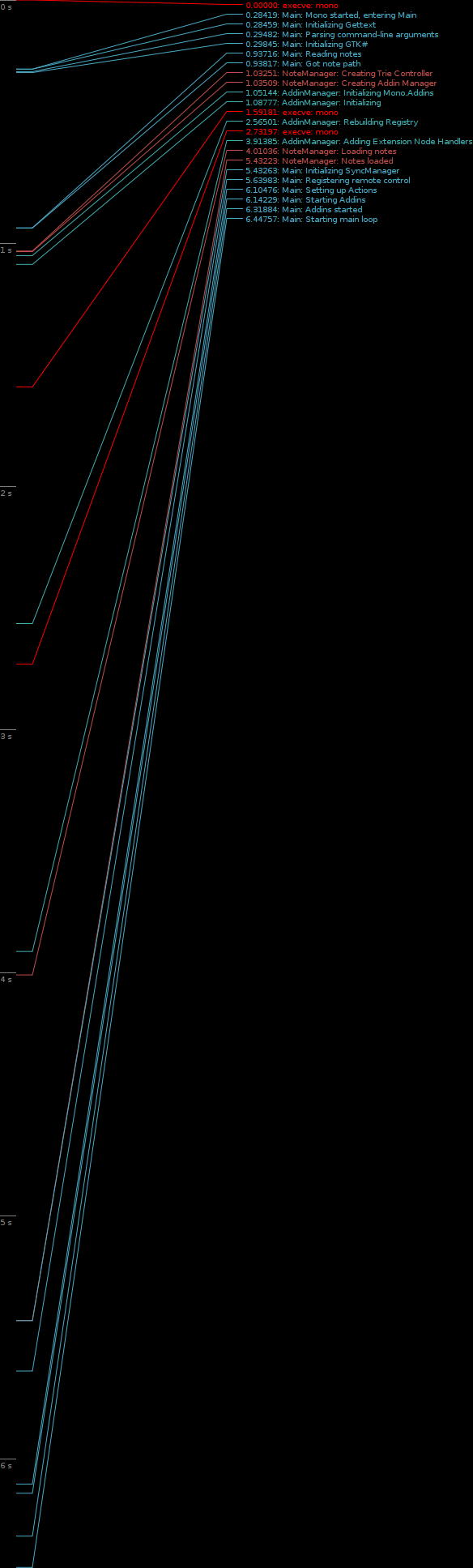
Tomboy startup (click for a full size graph)
Federico uses a nice trick using syscalls, which are logged using strace. Fortunately, this is very easy to reproduce with C#.
- First we need to generate them, add something like this to your program:
public class TraceLogger {

    public static void trace (string group, string format, params object[] args)

    {

        string message = String.Format (format, args);

        string str = String.Format ("MARK: {0}: {1}", group, message);

        Mono.Unix.Native.Syscall.access(str, Mono.Unix.Native.AccessModes.F_OK);

    }

}
- Liberally sprinkle tracing statements in your code, like this:
TraceLogger.trace("Main", "Starting main loop"); - Modify your startup script so that the line containing “
exec mono ...” now reads “exec strace -ttt -f -o /tmp/timeline.strace mono ....“. - Use Federicos script to plot it:
python plot-timeline.py -o graph.png /tmp/timeline.strace.
That’s all there is to it. The attentive reader will notice that I used the tracing format a bit differently, rather than printing the program name, I use a group parameter. This makes the graph easier to interpret: if you add too many tracing statements, it might be hard to see where the big gaps are. Hijacking the color coding avoids this interpretation difficulty.
Now hurry up and make your Mono apps even faster!
Related
- Version Control Choices (January 5, 2009)
- FOSDEM 2009 (December 5, 2008)
- F-Spot 0.5.0 (September 19, 2008)
- F-Spot Sidebar Editors + Histogram (August 12, 2008)
- Gegl# bindings updated (August 8, 2008)