Summer of Code Update

Google Summer of Code
Lots of activity around F-Spot lately. As there’s a number of people very curious about what I’m doing, I’ve made a small screencast providing a sneak preview.

In the screencast I first highlight the old editing tools below, which are quite hidden. I then show you how the new tools will be implemented.
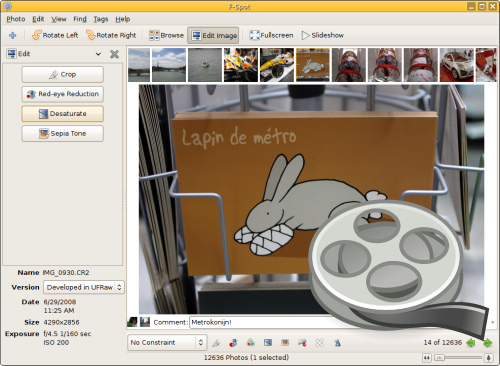
Editor sneak preview
Click for screencast (Ogg Theora)

The UI is still very basic, as my GTK+-fu isn’t all that strong.

F-Spot performance enhancements
At the same time, both Stephane Delcroix (my mentor, who should really blog more!) and me are working on big patches to improve F-Spot performance. Expect a much smoother experience soon!

This entry was tagged , , . Bookmark the permalink.

9 Responses to Summer of Code Update

  1. Alex Launi says:

    Cool stuff, as part of your project are you going to add an undo button to the edit menu? Even if it just called jumped back one version, no undo is confusing as hell.

  2. RubenV says:

    I agree, but I am not planning on adding undo. With the current architecture, this is very hard to do. I am planning on looking into GEGL support somewhere later this summer, which should make it easier to add though.

  3. RubenV: Solve undo as Picasa, make a hidden folder that stores the original. Then you can always revert to the original if need be.

    When is F-spot going to be quick then I wonder? Speed optimizations in day-to day use is more important for me than the ability to tamper with photos.

  4. RubenV says:

    Mårten: We do keep the original version, that one is never touched (you can switch versions using the dropdown on the left).

    As for the speed: That’s coming, really really soon. I have a big patch ready and Stephane has one as well. Together, it’ll kick ass.

    But that’s just the start, am doing all I can to clean things up and make them faster, but there’s *a lot* of work to do, with way too little developers.

  5. John McHugh says:

    Hi, great work…. Any chance you could make it so that you can hide the metadata on the bottom of the left sidebar. I always wanted the ability to hide it :D :P

  6. mike says:

    Good work so far, glad to see F-spot getting some love.

  7. Stijn says:

    I love the new side bar, this enables you to ‘easy’ implement other views like folder view or map view (geotagging)

  8. Robert Smol says:

    Hi,
    it looks ok. regarding the speed, would it be possible to FIRST do the showing up the picture THEN do that fancy animation which scrolls over the miniatures in the top bar?
    At home, I have to wait like 5 seconds to see the picture in good quiality (it first shows a ‘demo’ of the picture, then that fancy animation starts for 4 seconds and lastly the quality of the viewed image is improved).

  9. Bob W. says:

    I second the request from John McHugh. An option to hide/remove the info box at the bottom of the left sidebar would be great. I always found that for me that box is just waisting space.

Leave a Reply

Your email address will not be published. Required fields are marked *

*

You may use these HTML tags and attributes: <a href="" title=""> <abbr title=""> <acronym title=""> <b> <blockquote cite=""> <cite> <code> <del datetime=""> <em> <i> <q cite=""> <strike> <strong>